
WORDPRESS PERFORMANCE / CORE WEB VITALS
WordPress Speed
Optimisation.
Make your WordPress website faster for real visitors. I measure what is slowing your pages, fix the causes in themes, plugins, images and scripts, and help you pass Core Web Vitals.
Jagjeet Singh · India-based · Remote projects for businesses and agencies
CORE WEB VITALS, EXPLAINED
Three numbers.
Real visitors.
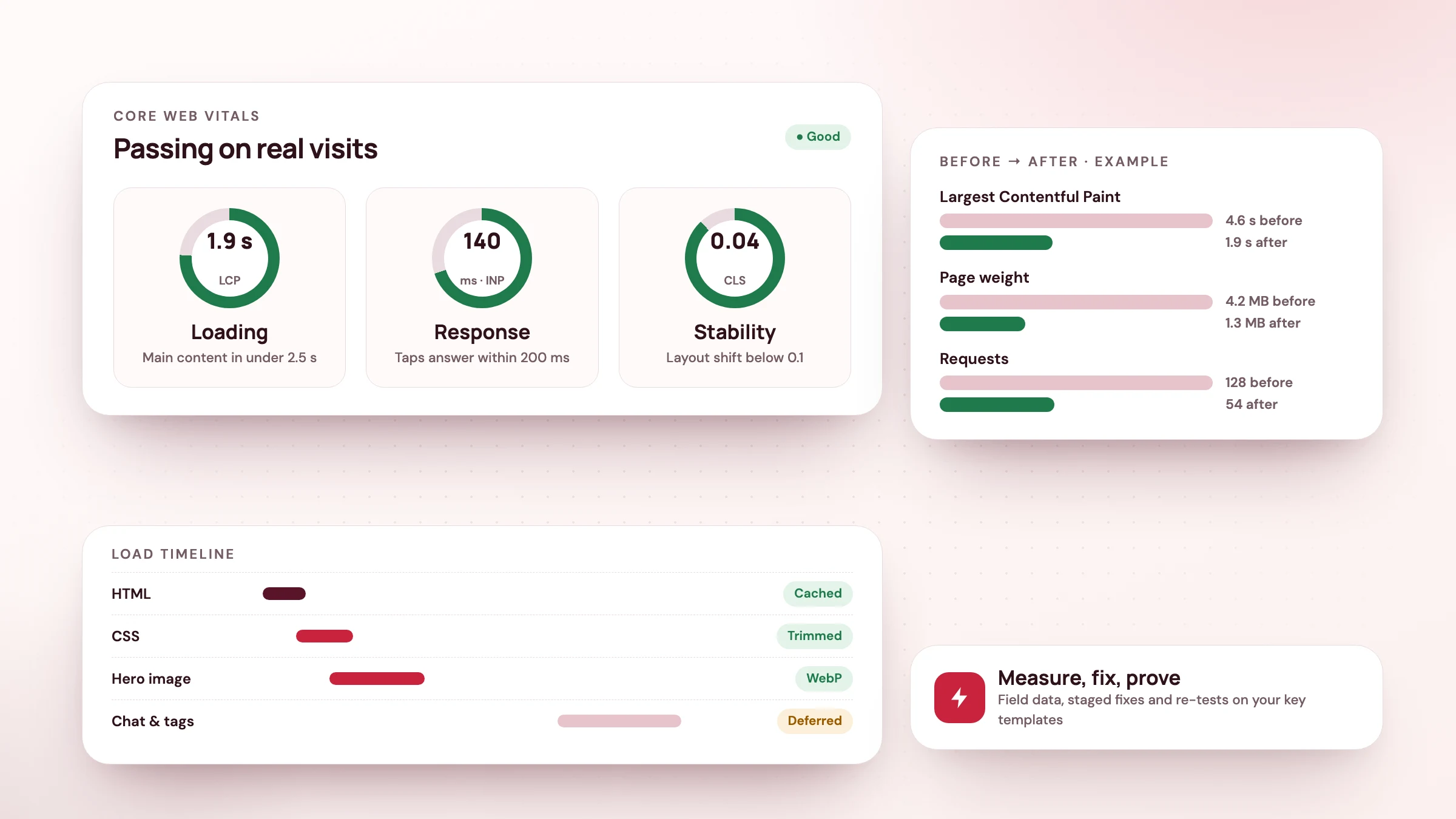
LCP · loading
The main content appears within 2.5 seconds.
INP · responsiveness
Taps and clicks respond within 200 ms.
CLS · stability
Layout shift stays below 0.1.
Google’s “good” thresholds · measured on real visits
WHAT WE CAN IMPROVE
Measure first.
Then fix the real causes.
Speed work starts with evidence, not a plugin. We look at field data from real visitors, lab tests and the templates that matter most, then fix what makes the biggest difference.
WordPress speed optimisation usually involves several layers at once: hosting and caching, theme and builder output, plugins, images, fonts and third-party scripts. Each fix is tested so the site stays stable and editable. You can also read how to scope Core Web Vitals fixes before preparing your brief.
Speed & Core Web Vitals audit
Review field data, PageSpeed and template-level tests. Get a prioritised list of causes, estimated impact and the fixes worth doing first.
Theme & builder clean-up
Reduce heavy markup and unused CSS and JavaScript from themes and page builders, including Elementor container and asset settings.
Plugin review
Find plugins that slow every page, overlap or run on pages that do not need them, then remove, replace or load them conditionally.
Images, fonts & media
Serve modern image formats at the right sizes, lazy-load below the fold, preload what matters and tidy font loading.
Caching, CDN & hosting
Configure page and object caching, a CDN and database clean-ups, and advise when the hosting plan is the real bottleneck.
Third-party scripts & INP
Audit tag managers, chat widgets and tracking scripts, delay or defer what can wait and fix long tasks that hurt responsiveness.
HOW THE PROJECT MOVES FORWARD
Measure it. Fix it.
Prove the result.
01
Measure the baseline
Record field data and lab tests for your key templates, so every change can be compared with where you started.
02
Prioritise the causes
Agree the fixes with the best expected impact for the effort, and any that need a plugin, hosting or design decision.
03
Fix & test in staging
Apply changes in stages, test forms, checkout and tracking after each one, and re-measure the affected templates.
04
Release & monitor
Release the improvements, compare results with the baseline and watch field data as it updates over the following weeks.
WORK DIRECTLY WITH THE DEVELOPER
A person to talk to.
Work you can review.

Jagjeet Singh
6+ years of WordPress and web development experience
Performance work is part of my WordPress development, including on large business sites. Bring your site and the pages that matter most; we can review the evidence and agree which fixes are worth doing first.

RELEVANT WORDPRESS EXPERIENCE
Recykal
WordPress page development, performance work, user experience and content presentation. This example shows my broader WordPress work; your site’s speed is measured and reviewed separately.
A PROPOSAL FOR YOUR ACTUAL PROJECT
Start with the requirements.
Then agree the scope.
The number of templates, theme and builder setup, plugin count, hosting and third-party scripts determine the work. Hosting upgrades, CDN plans and premium plugins are identified separately. Share your site and the pages that feel slow to start.
Failing Core Web Vitals?
Share your website and, if you have it, a Search Console Core Web Vitals report or PageSpeed result.
Slow Elementor or builder site?
Share the theme, builder, key add-ons and the templates that load slowly for your visitors.
Speed check before a redesign?
Share the current site and the plans, so performance is built into the new templates from the start.
BEFORE WE START
WordPress speed.
Your questions, answered.
What are Core Web Vitals?
Google’s measures of real-user experience: Largest Contentful Paint for loading, Interaction to Next Paint for responsiveness and Cumulative Layout Shift for visual stability. They are measured on real visits and form part of page experience in Search.
Can you guarantee a 100 PageSpeed score?
No, and a perfect lab score is rarely the right goal. The aim is passing Core Web Vitals for real visitors on your important pages, with a site that stays stable and editable. Results depend on hosting, content and third-party scripts.
Why is my Elementor site slow?
Common causes are nested sections, many add-ons, large images, unused CSS and JavaScript, and heavy third-party scripts. Moving to containers, consolidating styles and loading assets only where needed often helps a lot.
Will a caching plugin fix everything?
Caching helps load times, but it does not fix heavy pages, large images or slow scripts. It works best alongside clean templates, optimised media and a sensible plugin set.
Do I need better hosting?
Sometimes. If server response is slow even for cached pages, hosting is likely a bottleneck. The audit shows whether hosting, the site itself or both need attention before you change plans.
How long until results show?
Lab tests change straight away. Field data in Search Console reflects real visits collected over about 28 days, so improvements appear there gradually after release.
How much does WordPress speed optimisation cost?
It depends on the number of templates, the builder and plugin setup, hosting access and third-party scripts. An audit gives a clear, prioritised scope. Hosting and premium tools are listed separately.
Can you keep the site fast after the work?
Yes. Speed can drift as content, plugins and scripts change. Performance checks can be added to a monthly maintenance plan, with re-tests after significant updates.
Performance references: web.dev: Web Vitals and Google Search: Core Web Vitals.
LET’S TALK ABOUT YOUR SITE
Is your site slow?
Let’s find out why.
Share your website, the pages that feel slow and any reports you already have. I will review the evidence and follow up with the likely causes and a practical scope.
India-based · Collaboration hours agreed with your team
Choose your country / calling code, then enter your mobile number. India (+91) is selected by default.
Your details are used to respond to your enquiry. Please keep passwords and private customer records out of the form. Privacy policy.
MORE WORDPRESS SUPPORT
Find the right
WordPress support.
WordPress maintenance
Keep speed, updates, backups and fixes covered every month.
Website redesign
Rebuild a site that is too heavy to fix with performance-first templates.