
SHOPIFY DEVELOPMENT / MAINTENANCE & SUPPORT
Shopify Store
Maintenance.
Keep your Shopify store running smoothly while you focus on selling. I handle theme updates, fixes, app reviews and store improvements under a clear monthly scope or one-off requests.
Jagjeet Singh · India-based · Remote projects for businesses and agencies
STORE CARE, PLANNED CLEARLY
A clear scope.
A store that keeps selling.
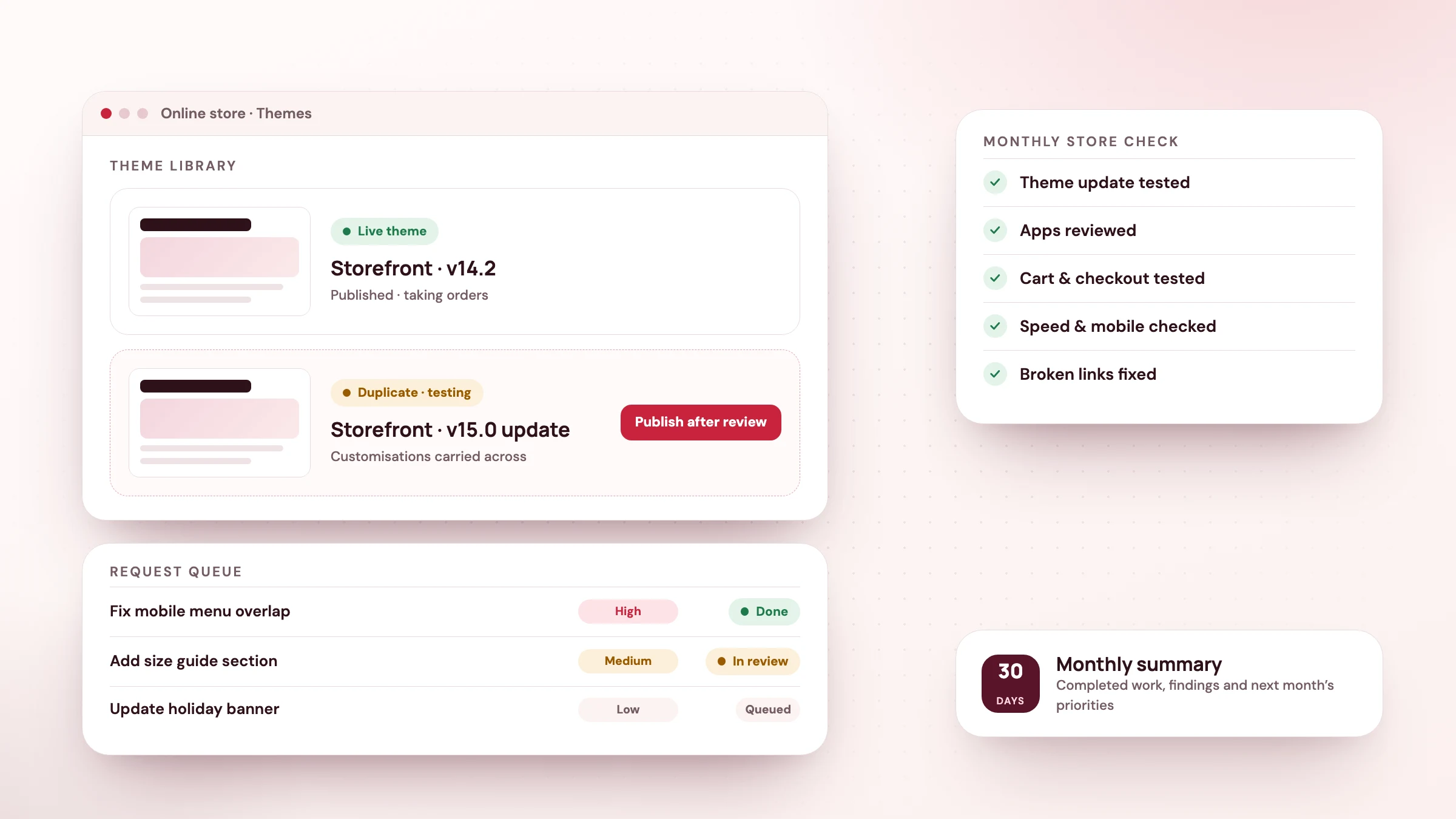
Safe theme changes
Work in a duplicate theme, then publish.
Fixes & requests
A queue with clear priorities and updates.
Monthly check-in
Speed, apps and checkout reviewed.
Example support routine · tailored to your store
WHAT SUPPORT CAN COVER
Fewer surprises.
Steady store improvements.
Choose ongoing monthly support or a defined set of fixes. The agreement sets out what is covered, how requests are prioritised and how changes are tested before customers see them.
Shopify maintenance is different from WordPress care: Shopify runs the hosting and checkout, so support focuses on your theme, apps, content, integrations and the changes your team needs. Testing in a duplicate theme keeps live orders safe. You can also read about theme updates without disrupting live orders before preparing your brief.
Theme updates & upgrades
Apply theme updates or move to a newer Online Store 2.0 theme in a duplicate, carry customisations across and test before publishing.
Fixes & small changes
Resolve layout bugs, broken sections and content changes from a prioritised request list, with clear updates on each item.
App review & clean-up
Review installed apps, remove leftover code from uninstalled ones and replace overlapping apps that slow the store down.
Speed & storefront checks
Check key templates for speed, broken links and mobile issues, and keep images and scripts under control as the store grows.
Checkout, shipping & payments
Investigate shipping rates, discounts and payment issues, and keep checkout settings consistent with how you sell.
Monthly improvements
Use spare hours for agreed improvements such as new sections, landing pages or product page tweaks that support your sales goals.
HOW THE PROJECT MOVES FORWARD
Agree it. Maintain it.
Report on it.
01
Review the store
Look at the theme, apps, recent issues and your plans, then agree what support covers and how requests come in.
02
Set up a safe routine
Create a working duplicate theme, a request list and a release routine so changes never surprise live customers.
03
Handle requests & updates
Work through fixes, updates and improvements by priority, testing each change on desktop and mobile before release.
04
Report & plan ahead
Share a short summary of completed work and findings, and agree priorities for the following month.
WORK DIRECTLY WITH THE DEVELOPER
A person to talk to.
Work you can review.

Jagjeet Singh
6+ years of WordPress, Shopify and web development experience
My Shopify work focuses on storefront structure and product presentation for real stores. Bring your store and the issues you face today; we can review the setup and agree a support scope that fits.

RELEVANT SHOPIFY EXPERIENCE
BPB Online
Shopify development focused on storefront structure and product presentation for a technical publisher. This example shows my broader Shopify work; your store’s support needs are reviewed separately.
A PROPOSAL FOR YOUR ACTUAL PROJECT
Start with the requirements.
Then agree the scope.
The size of the store, theme customisation, number of apps, request volume and response expectations determine the scope. Apps, Shopify plan costs and third-party services are identified separately. Share your store and what you need help with to start.
Need ongoing monthly support?
Share the store, the kinds of requests you expect and how quickly you usually need changes made.
Have a list of fixes now?
Share the store and your current issues, with screenshots or links, for a one-off scope and estimate.
Supporting stores for an agency?
Share the client stores, request process and handover expectations for white-label support.
BEFORE WE START
Shopify support.
Your questions, answered.
What does Shopify maintenance include?
Theme updates, fixes, app reviews, content changes, speed and storefront checks, and agreed improvements. Shopify handles hosting, security patches and checkout infrastructure, so support focuses on your theme, apps and store setup.
Do you offer monthly plans or one-off fixes?
Both. Monthly support suits stores with regular requests and improvements. One-off work suits a defined list of fixes, a theme update or an app clean-up. We agree the scope before starting.
How do you avoid breaking the live store?
Changes are made and reviewed in a duplicate theme, then published at an agreed time. Checkout, cart and key product pages are tested on desktop and mobile after each release.
Can you update my theme without losing customisations?
Yes. We list your customisations first, apply the update in a duplicate theme, carry the changes across and test before publishing. Heavily modified themes may need extra time.
Can you remove apps we no longer use?
Yes. Uninstalling an app can leave code in the theme. We review each app, remove leftover snippets and check that features depending on it still work or are replaced.
How quickly do you respond?
Response times are agreed in the support scope, including how urgent issues are flagged. I am based in India, and collaboration hours are set to suit your team and time zone.
How much does Shopify maintenance cost?
It depends on store size, theme customisation, app count and how many requests you expect. Share your store and needs for a scoped proposal. Apps and Shopify plan costs are listed separately.
Do you support stores for agencies?
Yes. I provide white-label Shopify support for agencies, with agreed communication, request handling and confidentiality around your client relationships.
Platform references: Shopify Help: duplicating themes and updating themes.
LET’S TALK ABOUT YOUR STORE
Need Shopify support?
Let’s define the next step.
Tell me about your store, the issues or requests you have and how often you need help. I will follow up to discuss the right support scope.
India-based · Collaboration hours agreed with your team
Choose your country / calling code, then enter your mobile number. India (+91) is selected by default.
Your details are used to respond to your enquiry. Please keep passwords and private customer records out of the form. Privacy policy.
MORE SHOPIFY SUPPORT
Find the right
Shopify support.
Shopify development
Explore Shopify store builds, theme work and storefront improvements.
Shopify B2B development
Add company accounts, wholesale pricing and quick ordering.
White-label Shopify
Add a remote Shopify developer to your agency’s delivery team.