Webflow is excellent for a small team that wants visual control over a designed marketing site. Businesses usually look at WordPress later, when the content operation grows: more editors, more integrations, multilingual content, a members’ area or simply a wish to own the hosting and codebase outright.
A Webflow to WordPress move is not a copy and paste. Webflow’s designer, CMS and hosting are tightly connected, and WordPress separates them. This guide covers what transfers cleanly, what has to be rebuilt and how to protect the search traffic your current URLs already earn.
Decide why you are moving before you plan how
Write down the two or three problems WordPress should solve. Typical reasons include editor roles and workflows, plugin-based features such as memberships or multilingual content, deeper CRM integration, cost at your content volume, or a wish to self-host. Those reasons decide the build. A team moving for editorial workflow needs a carefully modelled editing experience. A team moving for integrations needs its data flows specified first.
If the main complaint is one missing feature, check whether a Webflow integration or some custom Webflow development solves it before committing to a rebuild. A migration is worth it when the platform no longer fits the way the business works.
Inventory everything Webflow holds
List everything the current site depends on, not just its pages:
- Static pages and their sections, including components reused across pages.
- CMS Collections, their fields and the reference and multi-reference fields that connect them.
- Collection template pages and the URL pattern each one uses.
- Interactions and animations, including scroll and page-load effects.
- Forms, where submissions go and any automations attached to them.
- Images, PDFs and videos, plus custom code added in page or site settings.
- Integrations such as analytics, tag managers, chat, CRM and e-commerce tools.
This inventory becomes your scope. Anything missing from it tends to surface as a surprise a week before launch.
Map CMS Collections to WordPress content types
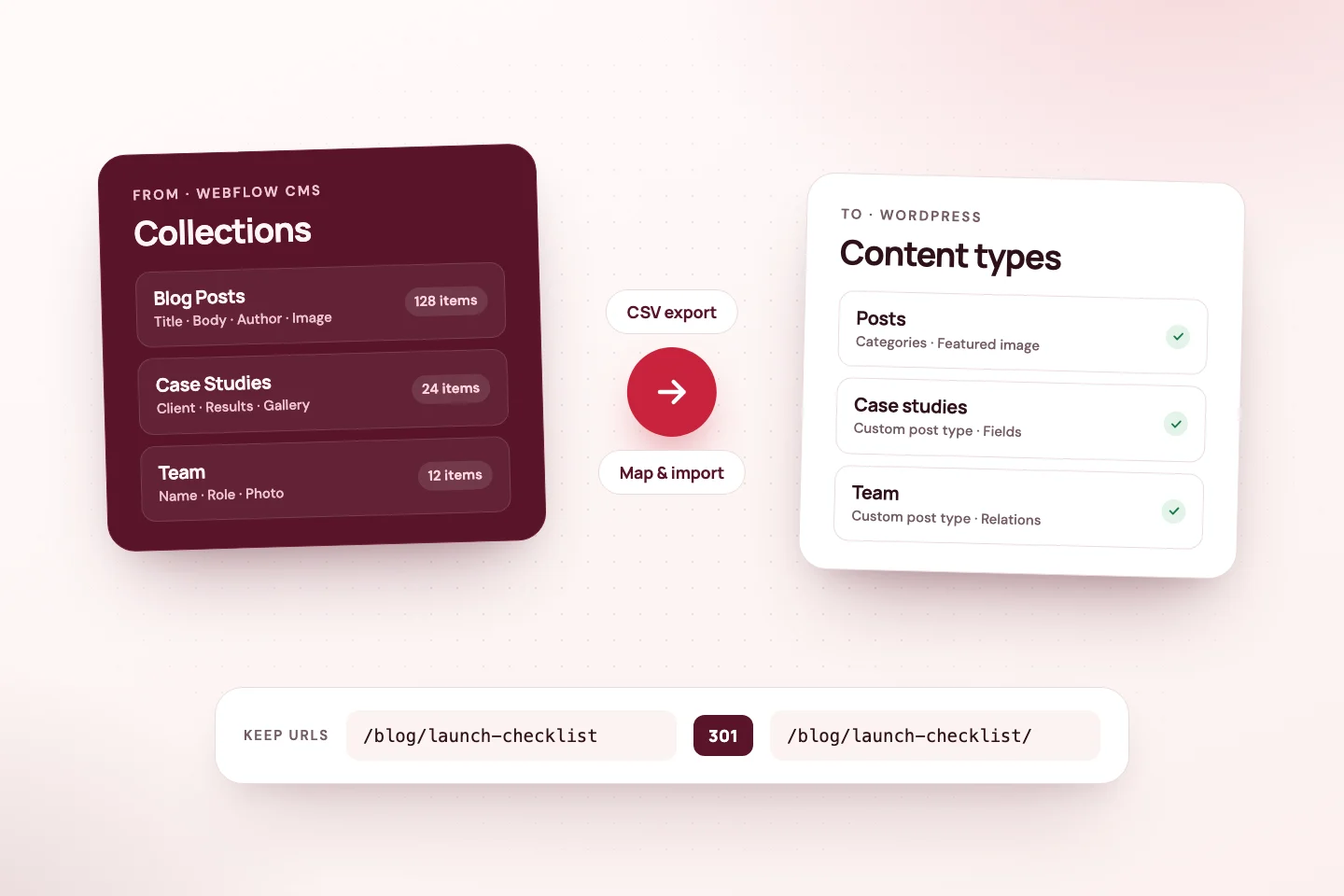
Webflow lets you export Collection items as CSV, which gives you the raw content. The design decision is where each Collection should live in WordPress.
| Webflow | WordPress equivalent | Watch for |
|---|---|---|
| Blog Posts Collection | Posts with categories or tags | Authors, featured images and original publish dates |
| Other Collections, such as case studies or locations | Custom post types with custom fields | Field types such as rich text, colours and option lists |
| Reference and multi-reference fields | Taxonomies or relationship fields | Two-way relationships and display order |
| Rich text fields | Block editor or page-builder content | Embedded media, custom code and heading levels |
| Collection template pages | Single templates for each post type | Layout differences between items |
Exported image fields point to files hosted by Webflow. Download those files and import them into the WordPress Media Library, so the new site does not depend on Webflow’s asset hosting after you close the old plan.
Rebuild the design and interactions deliberately
If your Webflow plan includes code export, the exported HTML and CSS make a useful visual reference, but they are not a WordPress theme. Rebuild the layout as a WordPress theme or with a page builder such as Elementor or Bricks, using reusable templates and global styles so editors can create new pages without breaking the design.
Interactions need the same care. List each animation and decide whether it supports the content or only decorates it. Recreate the meaningful ones with your builder’s motion features or a library such as GSAP, and check them on mobile and with reduced-motion settings. This is also a good moment to drop effects that slow the page down.
Keep every URL that earns traffic
Webflow Collection pages follow patterns such as /blog/post-name. WordPress can match most of them through permalink settings and custom post type slugs. Where a URL has to change, add a 301 redirect from the old address to the closest new page.
Before launch, export the current URL list from your sitemap and from analytics or Search Console, then test every important URL on the staging site. Carry page titles, meta descriptions, social sharing images and image alt text across with the content, because they are easy to lose in a CSV-based move.
After launch, submit the new sitemap, watch for 404 errors and compare traffic to your key pages over the following weeks.
Move forms, integrations and the domain
Webflow forms send submissions to Webflow and often on to email or an automation tool. In WordPress, choose a form plugin, recreate each form with the same fields and validation, and reconnect every destination, such as your CRM, inbox or automation platform. For CRM delivery, plan the field mapping and duplicate checks before launch. Send one real test submission per form and follow it all the way through.
Plan the domain change last. Lower your DNS TTL a day or two in advance, point the domain to the new host at a quiet time, confirm that SSL is active and keep the Webflow site available until the WordPress site has been checked on the live domain.
Common questions
Will I lose Google rankings when moving from Webflow to WordPress?
Rankings depend on content, URLs and technical health. If you keep URLs or redirect them correctly, carry metadata across and keep the site fast, a migration should not cause lasting loss. Some short-term movement while Google recrawls the site is normal.
Can the Webflow design be copied exactly?
It can be recreated very closely, but it is rebuilt rather than imported. Budget time for templates, responsive behaviour and interactions.
How long does a Webflow to WordPress migration take?
That depends on the number of templates, Collections, interactions and integrations. A short brochure site and a large CMS-driven site are very different projects, so scope from the inventory rather than from a page count.
Share your Webflow site and goals
Send your Webflow site address, your list of Collections and the reasons you want to move. I can map the content to WordPress, flag what needs rebuilding and give you a migration plan with URL handling and a launch checklist.